
|
GB EZ Online (EZO) was launched last summer as an online version of GB EZ, our calendar data entry software first made available in 2001. This past fall we had over 1,000 customers submit their order using EZO. The launch and subsequent usage went well. The advantage of an online version over issuing the program on a CD is that the programming can be changed when an issue pops up meaning we do not have to live with a problem until the next CD is issued. We are currently working on changes for EZO. If you have suggestions for changes you would like to see, send them to info@gordonbernard.com. We are currently inserting a sheet in your Promotion Kit that contains your Username and Password. Your Username is based on the email address we have on file for you. If we do not have an email address on file for you, there are instructions on the bottom of the sheet on how to get started with EZO. Regardless of how you submitted your order in the past, we have transferred your listings data to GB EZ Online. If you have used GB EZ CD in the past to submit any other information, such as advertising, order information or to collect your household and salespeople information, we have transferred that information to EZO as well. Here are a few other important points to remember:
Promotion Kit Shipping Schedule Since you are receiving this newsletter, you will probably be the person who will receive the Promotion Kit containing the working materials for your next calendar campaign. These kits are shipped via UPS several months ahead of your calendar order deadline. The Promotion Kit shipping schedule for the coming months looks like this:
Organizing Your Calendar Campaign Our Group Has Never Produced A Calendar, How Do I Get Started?
If you have received information in the past and would like to get started, give me a call or send me an email. My contact information is at the top of this newsletter. If it has been awhile since we talked and you would like some updated information, again, let me know and I will be glad to send new samples and pricing information. |
 This newsletter is sent to current Gordon Bernard Company customers as well as those who have expressed an interest in producing a calendar. We have several reasons to send this newsletter to you.
An Animal Shelter Raises Over $8,000.00! We love to share success stories from our customers. This customer chooses to remain anonymous but their story is worth telling. The calendar is sponsored by an animal shelter organization in the upper Midwest. This past year they set up a calendar project with four forms of income. The first two income sources – selling calendars and advertising, we see all the time, although maybe not quite as aggressively priced as this group. The group produced a pictorial calendar (different picture every month) and sold them for $10.00 which is an average price for a pictorial calendar. They printed four display ads on the bottom of each calendar page. The advertising rate was determined by how many months the ad would appear. One month cost $70.00, three months cost $200.00, six months cost $350.00 and an ad on all twelve months was $600.00. This group added another two additional profit centers that are a little unique but more than doubled their profits. People were encouraged to log on to the animal shelter’s website and upload a favorite picture of their pet to be printed on the calendar. There was a $5.00 charge for the upload. A balloting procedure was then set up to determine which pet’s photo would be printed on each month. People were then encouraged to log on and vote for their favorite photo. Additional income was generated via a 25 cent charge for each vote. The voting effort alone raised nearly $5,000.00 for the organization! We are always bragging on great customers. If you have a story to tell, send it to info@gordonbernard.com. We will feature your group in a future newsletter. If you can add pictures, that is even better! Once every four years, February 29 listings can be entered like all other listings. For GB EZ, this means that any listings that fall on February 29, 2012 will be entered on the February 29 date in the Listing module. In non-leap years, February 29 listings are entered via the Extra Date Block module since the computer calendar does not recognize a February 29 listing in a non leap year. In 2013, 2014, and 2015 February 29 listings will again be entered in the Extra Date Block module. Your calendar is valuable to both your organization and your community. Some of this value is information. The events that are listed on the days make your calendar a valuable source of community information. If you include Fire Safety or First Aid information, your calendar can actually help save lives. Adding coupons or incentives gives your calendar a monetary value both for the people who receive the calendar and the advertisers who provide incentives through coupons or advertising copy on your calendar. Here are some good examples of ways to add value to your calendar through advertising:
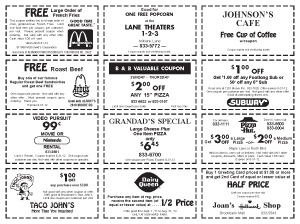
On a Tear Sheet Calendar, the most value can be added through the use of coupons on the back of each monthly sheet. At the end of the month, the sheet is usually torn off and discarded. Adding a set of coupons that can be redeemed creates a “Win-Win-Win” situation. The holder of the calendar gets to recoup their purchase price by using the coupons. Walk-in revenue is generated for the coupon advertiser. A third “win” is for your organization in terms of another source of revenue. Let’s suppose your group distributed 500 calendars with 12 coupons on the back of every sheet with an average value of $1.00 each and were sold to the advertiser for $100.00 each: For the person redeeming the coupons:
For the advertiser:
For your organization:
Coupons can be added to Pictorial Calendars by either copy in Display advertising or printing a set of coupons on the back cover of your calendar and/or the backside of the last month.
One of the great attributes of our calendar project is that you can set your own prices for calendars and advertising. You even have the flexibility to charge more for your advertising and give the calendars away free of charge. Even though what you charge is up to each individual group, we still get the question quite often on what to charge for calendars and advertising.
It is always discouraging to hear from a group that has decided to discontinue producing a calendar because they are not making any money only to learn they have not adjusted their prices in 25 or 30 years. If you have not raised prices in awhile, we would suggest reviewing your profit needs verses the prices you are charging. We will again be hosting a series of “How To” webinars in July, August, September, and October. Exact dates and topics will be announced in the spring newsletter. |



Most states have a regional sales manager who is available most anytime to assist you with questions you may have about your calendar order. All states are supported with a toll free number and an email address. Click here to obtain the number and email address for your state. If you need to contact the GBC Home Office, call 1.800.531.1484 or send emails to info@gordonbernard.com. Our office is open Monday through Friday from 8:00 AM to 4:30 PM. |
back to top | Comments or Questions Gordon Bernard Company, LLC 2011 |