| Calendar News |
| Autumn 2010 |

|

Ramping up for the Busy Season Being in the calendar business, we do have six months out of the year when we are extremely busy. Even though we start calendars with any month, about two-thirds of our customers still produce a January starting calendar. We add several seasonal employees to assist us in getting calendar orders edited and printed as quickly as possible. Many of our seasonal employees come back each year and work just during the busy season. Getting your calendar order edited and printed is broken down into several processes. When your order is received, it is checked in, an order number is assigned, and job ticket envelopes are created. The orders are then separated so the listings to be printed on the dates can be checked by listings editors, advertising can be checked by advertising editors, and pictures can be checked by our photo editors.
Here are a few things you can do to help us process and print your order in a timely manner: Submit your order using GB EZ Online (EZO) at www.gordonbernard.com/ez. You should have received a username and password in your summer newsletter. There is a Contact Us link in the upper right corner of the screen if you have trouble logging in. After you have submitted your order online, print the forms that EZO asks you to print and send them in with your payment. If you do not use EZO, you can fill out an order form from the Order Booklet that is included in your Promotion Kit. Follow the instructions on Page 12 and 13. If you receive an email from one of our editors with questions about what has been submitted, respond right away. Your order cannot be printed until editing questions are answered. If you receive a proof of your calendar prior to being printed, again, respond right away with corrections or approval. Your calendar order will be placed in a “Hold” file until we receive a response on your proofs. Do not assume anything! We will process and print over 2,000 calendar orders this fall. There is no way for us to remember special instructions from previous years. Give us clear and distinct instructions for anything unusual to be printed on your calendar. Enter special instructions on the Special Instructions tab in the EZO Order Form module or on page 28 in the Order Booklet. |
|||||||||||||||||||||||||||||||||||||||||||||














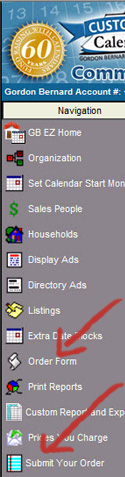 Submitting your order using EZO is a two step process. First, click on the Order Form link from the Navigation bar and fill out the information there. EZO will automatically total the number of listings and ads you have entered. Be sure to enter the calendar quantity, background color and number style you want used on your calendar. After you have completed the Order Form, click on Submit Your Order from the Navigation Bar. EZO will total your order and figure your shipping charges. This is also where you tell us where the calendars are to be shipped and who should receive your next Promotion Kit.
 |
We continue to be encouraged with how many of our customers are using EZO successfully. Since launching EZO on July 22, we have had thousands of page views and hundreds of orders submitted thus far. There have been some bumps in the road, which we expected, but overall, the great majority of you have made the transition to EZO from the CD version without much difficulty. We have listened to your comments and have updated EZO to include your suggestions several times already. In order for the transition to go as smoothly as possible, our goal for this first year is to make EZO work as much like our CD version as possible. We welcome your comments and suggestions. Click on the Contact Us link in the upper right corner of the EZO Home Page. If you have difficulty logging in or experience functionality issues with EZO, check out our (FAQ) section. We have posted a list of our most often asked questions on the right side of the EZO Home page. Click here to see the list.
We always acknowledge emails! If you send us a file, a response, or a question, we will always send you a reply. So – if you do not hear back from us, it probably means we did not receive anything from you. There are many reasons this might happen. The best thing to do is to resend the email. If you still do not get a reply back from us within one business day, give us a call (800.531.1484) and we will figure out an alternative plan. Sending Large Electronic Files Many of you are sending picture files to us electronically. The guidelines for the required picture resolution are listed in the Order Book. In most cases, this means the file size is going to be too large to attach to an email. The solution to this problem is to send the file via the FTP link on our website www.gordonbernard.com. Click on the FTP link in the lower left corner of the Home Page and follow the instructions. We will acknowledge receipt of the file as soon as it is processed in the home office. Your order deadline is printed on a bright sticker on the advertising back included in your Promotion Kit. If you submit your order by that date, we will do everything possible to ship your calendars prior to December 15. The earlier you send in your order, the sooner your calendars will be printed and shipped. We know that things happen and sometimes you cannot get your order to us by the deadline date. If that is the case, let us know you are running late. To be fair to all, we process orders by the date they are received. We run our presses 20 hours per day this time of year. Because of the volume of orders we receive at this time of the year, it usually takes us around 8 weeks to ship orders.
We ship all our orders, except orders to Alaska, via UPS. Naturally, everyone wants their orders shipped as quickly as possible. There are a few holidays coming up that will add extra shipping time. Here are a few days that will change normal UPS delivery:
Shipping and Handling Discount Remember that you can save a whopping 30% on shipping and handling on your calendar order by choosing not to have your tear sheet calendars inserted into paper sacks. Check the box in the Submit Your Order module to tell us you want to take advantage of this offer. If you are filling out your order from the Order Booklet, be sure to use the charges from the green columns on the Shipping and Handling Charts on Page 11. |


Webinars
We will be sending out email invitations for the webinars. To attend a webinar, you must respond to the invitation. You can request an invitation by sending a request to: webinar@gordonbernard.com. Please give the date and time for the webinar you wish to attend. You will view the webinar on your computer and listen via a phone connection. Other than the cost of the phone call, there is no cost to attend. All webinars will last approximately one hour. |
Most states have a regional sales manager who is available most anytime to assist you with questions you may have about your calendar order. All states are supported with a toll free number and an email address. Click here to obtain the number and email address for your state. If you need to contact the GBC Home Office, call 1.800.531.1484 or send emails to info@gordonbernard.com. Our office is open Monday through Friday from 8:00 AM to 4:30 PM. |
back to top | Comments or Questions Gordon Bernard Company, LLC 2010 |